Master Your Money: The Ultimate Personal Monthly Budget Template
Let’s be honest: managing money can feel like a chore. You open a spreadsheet, stare at a grid of empty cells, and immediately feel overwhelmed. As creatives, entrepreneurs, and busy professionals, we often have irregular income streams or complex expense categories that a standard calculator just can’t handle. That is exactly why I designed this Personal Monthly Budget Template. It isn’t just a collection of formulas; it is a visual command center for your financial life, designed with the same care you put into your own creative projects.
Designed for Clarity, Built for Control
The aesthetic of this template is rooted in modern typography and clean design principles. I wanted to move away from the chaotic, cluttered look of standard accounting software. Instead, the layout uses a structured grid system that leverages visual hierarchy to guide your eye from your total income down to your disposable balance. The typography choices here are deliberate; we utilize a sans serif font for data entry to ensure maximum legibility on screens of all sizes, paired with subtle display font headers that add a touch of personality without sacrificing professionalism. The color palette is muted and sophisticated, ensuring that when you open the file, it feels like a premium design asset rather than a tedious chore.
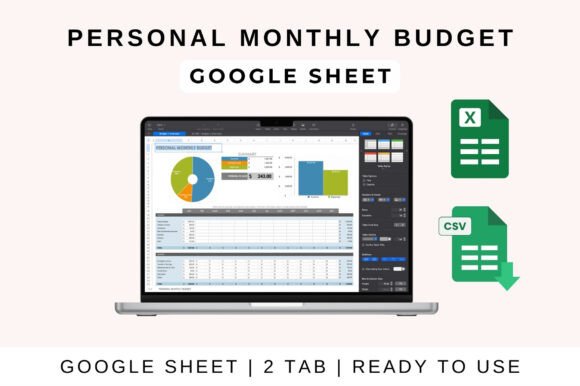
But style isn't enough; the tool needs to work. This Personal Monthly Budget Template is packed with functionality. It features auto-calculating fields that instantly update your totals and balance as you type. You don’t need to be an Excel wizard to make it work. The structure is broken down into intuitive sections: Housing, Transportation, Food, Entertainment, and Savings. This logical categorization helps you spot "spending leaks" immediately. For instance, if your "Food" category is creeping up, the visual charts provided in the template will highlight that trend instantly, allowing you to adjust before the month ends.
Practical Application for Digital Nomads and Creatives
One of the biggest challenges for our audience—designers, bloggers, and small business owners—is the disconnect between different software ecosystems. This is why the Personal Monthly Budget Template is built to be universally compatible. Whether you are a Google Sheets power user who needs real-time collaboration with a partner, an Excel devotee who prefers desktop processing power, or an Apple loyalist using Numbers, this file translates seamlessly across platforms.
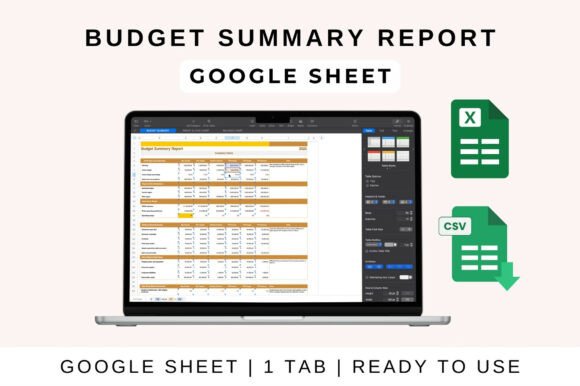
Let’s look at how this works in practice. If you are using Google Sheets, the workflow is incredibly fluid. You simply upload the file to your Drive. The interface is clean, allowing you to enter data quickly. The real magic happens in the "Automated Calculations" layer. As you input your freelance invoice payments or your monthly Adobe subscription fees, the sheet instantly calculates your remaining profit and loss. It’s a dynamic design asset that adapts to your cash flow.
For those who prefer MS Excel, the experience is just as robust. You download the file and open it locally. The formulas are locked and protected where necessary to prevent accidental breaks, but the input cells are fully customizable. This is particularly useful for brand strategists or marketers who might need to track client reimbursements or ad spend alongside personal grocery bills. The template allows you to adjust categories easily, meaning you can transform a personal budget into a project expense tracker with just a few clicks.
Visualizing Your Financial Brand Identity
Just as a logo design communicates the essence of a brand, your budget communicates the health of your business and personal life. This template includes visual charts that do the heavy lifting for you. Instead of reading rows of numbers, you can look at a pie chart to see exactly how much of your income is going toward "Housing" versus "Savings." This is a critical feature for entrepreneurs and content creators who think visually.
The charts are designed to be clean and unobtrusive, utilizing a modern typography aesthetic that would look right at home in an editorial design layout. This visual feedback loop is essential for accountability. When you can *see* that your entertainment spending is twice your savings contribution, it creates an immediate psychological trigger to correct course. It turns abstract financial data into a concrete story about your lifestyle.
Customization: Making the Template Your Own
A budget is a deeply personal thing, and a one-size-fits-all approach rarely works. That is why this Personal Monthly Budget Template is fully customizable. The architecture of the sheet is modular. If you are a crafter or hobbyist who spends a significant amount on materials, you can easily rename the "Entertainment" category to "Supplies" and adjust the formulas to track that specific spend.
Think of this template like a font pairing exercise. You have the solid foundation (the sans-serif data structure) which provides the reliability, but you have the freedom to change the "accent" (the category names and specific visual tweaks) to match your personal brand identity. The goal is to create a system that you actually *want* to open every week. If the tool fits your specific lifestyle—whether that involves tracking software subscriptions, shipping costs for an e-commerce store, or daily coffee runs—you are far more likely to stick with it.
Getting Started: A Step-by-Step Guide
To ensure you get the most out of this tool, here is a quick rundown of how to implement it into your routine, regardless of your preferred platform.
For Google Sheets Users:
- Upload and Open: Drag the template file into your Google Drive and open it in Sheets.
- Input Your Data: Start with your fixed income. Then, work through the expense categories. Don't worry about being perfect on the first pass; the goal is to get the data in.
- Review the Automation: Watch the "Balance" cell. It will automatically subtract your expenses from your income, showing you exactly what is left over.
- Collaborate: If you share finances with a spouse or business partner, use the "Share" button to give them editing access. This ensures everyone is on the same page in real-time.
For MS Excel Users:
- Download: Save the Excel version to your local machine or cloud storage.
- Enable Editing: Open the file and ensure you click "Enable Editing" if prompted, so the formulas can function.
- Customize Categories: Right-click on cells to rename categories to better fit your specific cash flow needs.
- Save Versions: It is good practice to "Save As" a new version for each month (e.g., "Budget_October") so you can look back at historical data later.
The Strategic Value of Financial Tracking
Why go through all this trouble? Because financial literacy is the bedrock of sustainable creativity. Whether you are a designer investing in new hardware or a publisher managing ad revenue, understanding your cash flow allows you to make strategic decisions. It helps you decide if you can afford that new premium font license or if you need to hold off for a month.
This Personal Monthly Budget Template is more than a spreadsheet; it is a tool for empowerment. It removes the guesswork from your finances, replacing anxiety with clarity. By consistently using this tracker, you build a habit of financial mindfulness that supports your long-term goals, allowing you to focus on what you do best: creating, building, and growing your brand.